-1.jpg?width=400&height=46&name=GHS_Primary_Logo_Landscape_Full_Colour%20(1)-1.jpg)
Account/enterprise administrators can add and manage vehicles in GetHomeSafe via the account menu. Vehicles can be added to your enterprise in two ways:
- Integration vehicles are imported automatically from a connected fleet management provider (see Supported Vehicle Integrations below). Their locations and alarm events sync to GetHomeSafe every minute.
- Manual vehicles are reference-only vehicles you add yourself. They don't require a vehicle integration, but they aren't connected to any fleet management or telematics service.
GetHomeSafe integrates with a range of fleet management providers. For more information, contact sales@gethomesafe.com.
Accessing Vehicles
- Log in to your Account web portal
- Head to "Configure" in the left-hand menu and select Vehicles
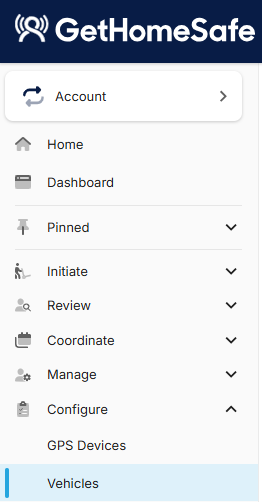
Note: Vehicles must be enabled for your account before you can add or manage them. An Account Administrator can enable vehicles in Account > Feature settings > Integrations.
Vehicle Provider Types
Every vehicle in your enterprise has a provider type, which shows where it came from and what data GetHomeSafe receives for it.
- Integration – imported automatically once a vehicle integration is connected. Location and alarm events sync every minute, alarm events can trigger Panic alerts and auto-start activities, and vehicles are shown on the Activity Locations Map.
- Manual – added by an account administrator in the Vehicles menu, with no vehicle integration required. These are reference only: no location or events are synced, they can't trigger alerts or start activities, and they aren't shown on the Activity Locations Map.
Supported Vehicle Integrations
GetHomeSafe currently integrates with the following fleet management providers:
- Argus
- EROAD
- Smartrak
- Teletrac Navman
- Webfleet
What Data Vehicle Integrations Send to GetHomeSafe
Once connected, a vehicle integration keeps GetHomeSafe up to date automatically. No action is needed from your team.
- Vehicles – your fleet's vehicles are imported into the Vehicles menu automatically.
- Location – each vehicle's last known location is updated every minute.
- Alarm events – checked every minute. GetHomeSafe raises a Panic alert when needed, and automatically starts an activity if one isn't already running.
Panic alerts raised from a vehicle notify team leaders and escalate in the same way as any other Panic alert.
Example: Location data from Teletrac Navman includes the vehicle's GPS coordinates, speed, direction and altitude.
Adding Vehicles via a Connected Integration
When you connect a fleet management integration, your vehicles are imported into GetHomeSafe automatically. You don't need to add them one by one.
- Access your Enterprise as an Account Administrator
- Check vehicles are enabled in Account > Feature settings > Integrations
- Open your Enterprise's Integration setup page
- Add your fleet management provider as an integration and enter the API keys or login details it requires
- Save to finalise the integration. Your vehicles will be imported and begin syncing their locations and alarm events
- Where available, use Fleet Mappings on the integration setup page to associate your fleets with particular organisations in your enterprise
Imported vehicles then appear in the Vehicles menu, where you can edit or unassign them.
For provider-specific setup steps, see:
- EROAD Integration
- How to set up an Argus Integration in GetHomeSafe
- How to setup Teletrac and GetHomeSafe
- Webfleet Integration
Adding a Manual Vehicle
Use a Manual vehicle when you want to record a vehicle in GetHomeSafe for reference, without connecting a fleet management integration.
- In the Vehicles menu, select Add vehicle
- Select Manual as the provider type
- Enter the vehicle details (e.g. vehicle name, registration, organisation, assigned user)
- Save
Note: Manual vehicles are for reference only. Because they aren't connected to a fleet management or telematics service, GetHomeSafe won't receive their location, ignition status or vehicle events. To track these, add the vehicle through a connected integration instead
Vehicles Menu
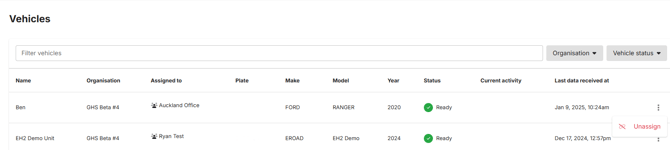
You can filter vehicles using the search bar, by organisation, by vehicle status and by provider type.
Select the three-dot menu (⋮) next to a vehicle to perform the following actions:
- Unassign vehicle
- View vehicle details
Edit Vehicles
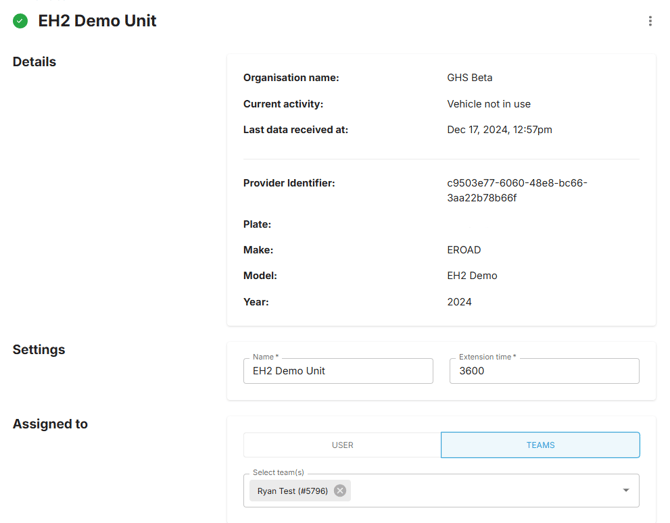
- In the Vehicles menu, select the vehicle you need to edit
- Edit the relevant vehicle details (e.g. vehicle name, registration, assigned user)
- Save
Need help? Contact support@gethomesafe.com for assistance with adding or managing your vehicles.