-1.jpg?width=400&height=46&name=GHS_Primary_Logo_Landscape_Full_Colour%20(1)-1.jpg)
Resuming and Active Activity:
-
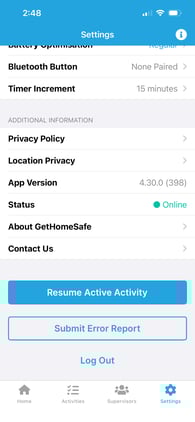
If an activity has been started (including from the web portal) and it is not displaying on the user’s GetHomeSafe app, navigate to the Settings page and select Resume Active Activity. If this does not work, try refreshing the GetHomeSafe app.
Refresh GetHomeSafe
-
To refresh the GetHomeSafe app on iOS, either double click the home button or swipe up from the bottom of an open screen. Navigate through the list of open apps and swipe up to close the GetHomeSafe app.
-
To restart the GetHomeSafe app on Android, either select the overview (recent apps) button or swipe up from the bottom of an open screen. Navigate through the list of open apps and swipe up or sideways to close the GetHomeSafe app.
Once refreshed, open the GetHomeSafe app. A spinning circle will display indicating that the app is launching. If the app opens straight away, it means that you have not refreshed the app correctly
If an active activity is still not displaying try restarting the mobile device or reinstalling the app.