-1.jpg?width=400&height=46&name=GHS_Primary_Logo_Landscape_Full_Colour%20(1)-1.jpg)
Tip - to use SMS capabilities ensure your mobile number is associated to your GetHomeSafe profile. You can check this in your settings in the GetHomeSafe app by selecting "Account Details":
When you have no internet connection the GetHomeSafe app will automatically offer SMS as an option to make an action in GetHomeSafe.
Note - the supported actions are:
- Check-In
- Finish
- Panic
- Time Check
- Extend Timer
- Quick-Start
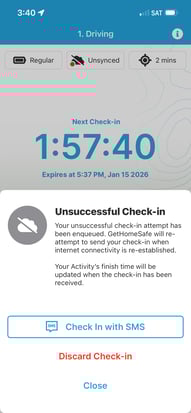
Here is an example of what a check-in looks like via SMS.
The GetHomeSafe app will detect if you have no internet connection, when you try to perform an action you will be presented with an option to perform an action. In this case, the option to check-in. Select "Check-in via SMS"
Once selected, your messaging app will open with a pre-populated message. This message contains all the information needed to update your action. All you need to do is press send: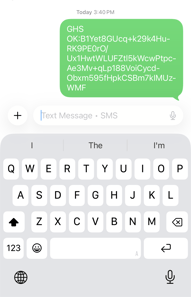
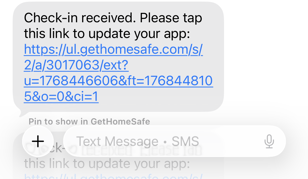
You will get a confirmation message confirming that your action has been received. In this message is a link, click this link will bring you back to the GetHomeSafe and update your timer.
I received a "We could not find a user associated with this device, please contact GHS support" message, what does this mean?
If you receive this message, it likely means that the phone number associated with your GetHomeSafe account is different to the number that the text is being sent through. To check the phone number associated with your GetHomeSafe account:
- Open the GetHomeSafe app
- Click on Settings in the bottom right of the screen
- Click on Account Details
- From here, you will be able to see the phone number associated with the account, double check that it is the same as the number you are sending SMS messages from.
If these look the same, take screenshots of both of these and send them through to support@gethomesafe.com, along with an explanation of your issue, and one of our support representitives will be in touch with you.