-1.jpg?width=400&height=46&name=GHS_Primary_Logo_Landscape_Full_Colour%20(1)-1.jpg)
Tip - if you are looking for a guide on how to pair the Minew B10 button, check out this knowledge base article: Pairing a Minew B10 Button
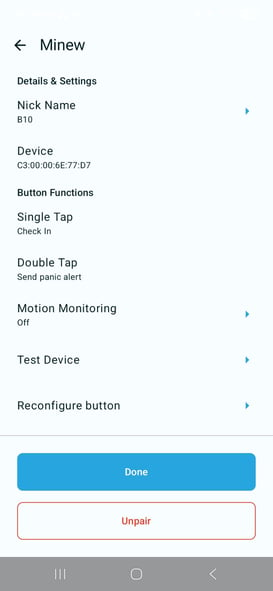
- Nickname: Customise the name of your B10 button within the app.
- Device: Displays the unique hardware address (MAC ID) of your button.
- Single Tap: Programmed to Check In.
- Double Tap: Programmed to Send panic alert.
- Motion Monitoring: Turn motion monitoring on or off. This allows the device to monitor movement during an active activity to add an extra layer of safety.
- Test Device: Select this to safely test if your B10 commands are being received. The test menu is available both during pre-start and active tracking to help ensure your device is communicating correctly.
- Reconfigure button: The B10 automatically configures the correct settings when initially paired. If you encounter any functional issues, tap this button to re-apply the correct configuration.
- Unpair: Unpair the B10 device from the GetHomeSafe App and your device.