-1.jpg?width=400&height=46&name=GHS_Primary_Logo_Landscape_Full_Colour%20(1)-1.jpg)
Important Note - Minew B10 button support is currently only available on Android devices.
Note on Behaviour - Unlike standard Bluetooth buttons, the B10 only utilises a full Bluetooth connection during initial pairing and configuration. Once configured, it enters an optimised listening/advertising state to preserve battery life while remaining fully responsive.
The process for connecting a Minew B10 button on your Android device is as follows:
- Ensure the B10 button is charged using its included charging cable and is not actively connected to any other mobile devices.
- Make sure Bluetooth is enabled on your mobile phone.
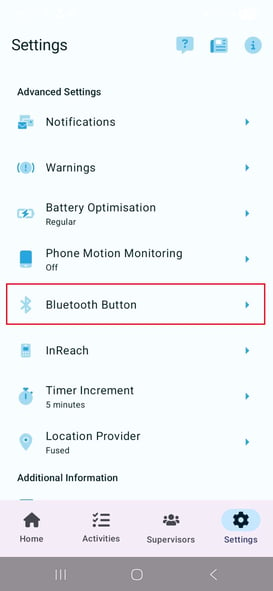
- Open the GetHomeSafe app, navigate to Settings, and select Bluetooth Button.
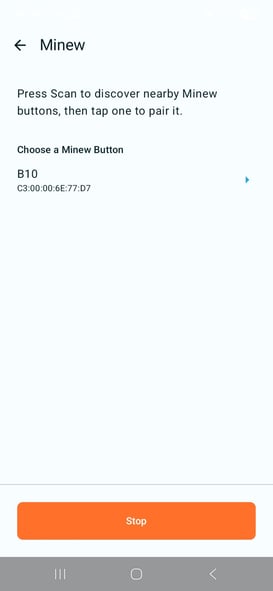
- Select Minew and tap Start Scanning (if the app doesn’t begin automatically).
- Activate your B10 button so it appears on the screen, then tap Pair.
- The B10 will automatically configure itself with the correct safety settings. Your button is now successfully paired
Having trouble pairing your B10?
If you are experiencing difficulty getting your B10 to show appear in the scanning menu, press and hold the button for 5 to 10 seconds. You will feel a vibration or see a flashing blue light. This will force the device to power on and is often required after charging.