-1.jpg?width=400&height=46&name=GHS_Primary_Logo_Landscape_Full_Colour%20(1)-1.jpg)
Where to find Hero
Hero is available directly within our web portal. You can access him by clicking the “✨Help Agent” button in the top header, or by clicking the support widget in the lower right corner of the Support & eLearning page.
Simply open either option to begin interacting with him. Hero is available 24/7 to provide instant answers, guide you to helpful resources, and connect you with our team whenever you need assistance.
1. The Chat Tab: Talk to Hero
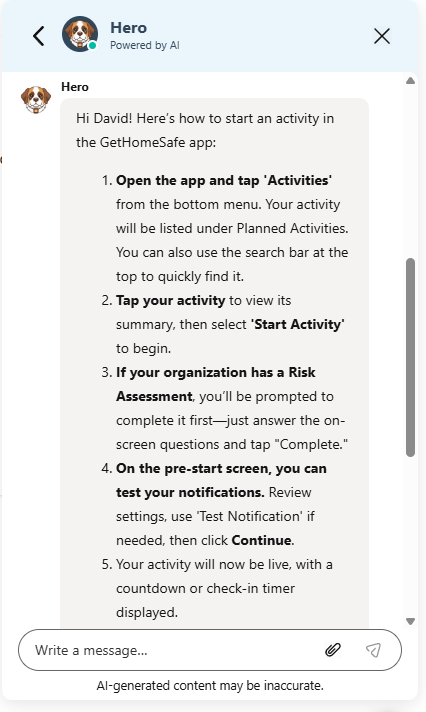
When you open the support widget, you will default to the Chat tab. This is where you can interact directly with Hero.
- Ask Anything: Simply type your question in the text box (e.g., "How can I set up multiple devices?") and Hero will analyze our entire knowledge base to provide a summary answer immediately.
- Smart Recommendations: Hero will suggest relevant articles based on your question.
- Human Handoff: While Hero is great at technical support and "how-to" questions, he knows when to call for backup. If you inquire about pricing, quotes, or enterprise upgrades, Hero will automatically offer to redirect you to a human support agent to ensure you get accurate, personalized account information.
- The Help Tab: Browse Resources
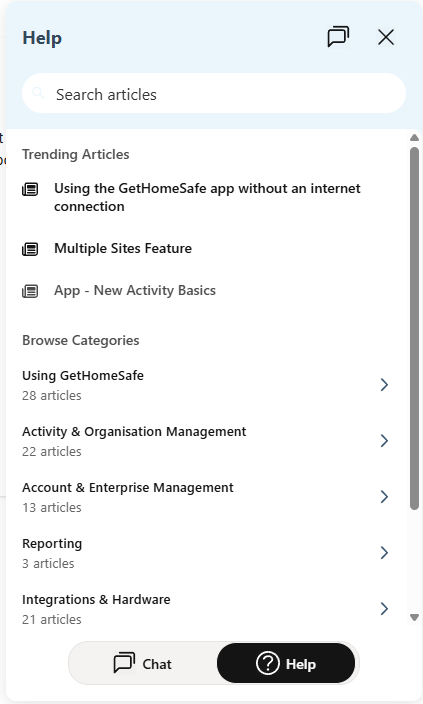
If you prefer to browse topics yourself rather than ask a question, click the Help button at the bottom of the widget.
- Instant Search: Use the search bar to find specific guides.
- Trending Articles: Quickly access the most frequently read guides (e.g., Using the App without an Internet Connection).
- Browse Categories: Navigate through topics like Activity Management or Account & Enterprise Management to find what you need.
- In-App Reading: When you click an article in this tab, it opens directly within the widget. You can read the full guide without being redirected to a new browser tab, keeping your workflow uninterrupted.
Switching Modes
You can switch between interacting with Hero and browsing articles at any time using the toggle at the bottom of the widget:
- Select Chat to speak with Hero.
- Select Help to search and browse articles manually.