-1.jpg?width=400&height=46&name=GHS_Primary_Logo_Landscape_Full_Colour%20(1)-1.jpg)
Part 1: Request Activation
Before beginning, you must be on an Argus Tracking MIDI or OMNI plan. Contact your Argus Tracking Account Manager to request that the GetHomeSafe integration be activated for your account.
Part 2: Generating API Keys in Argus
Once the integration is active, you need to generate two keys (an Access Key and a Secret Key) from the Argus Admin Portal.
- Log in to your Argus Dashboard as an Administrator.
- Navigate to Settings > API Keys.
- Click the blue 'Add' button in the top left corner.
- Name the Key: Give your new API Key a name (e.g., "GetHomeSafe Integration") and a description for your reference, then click Save.
- Copy Credentials: Your keys are now created. Copy both the Access Key and Secret Key immediately, as you will need them for the next step.
- Note: The Access Key syncs vehicle events, while the Secret Key provides the necessary authorization.
Part 3: Enabling the Integration in GetHomeSafe
After generating API keys you will need to enable Argus as an integration on the GetHomeSafe platform.
- Access your Enterprise as an Account Administrator.
- Copy your generated API Access Key and access your Enterprise’s Integration setup page.
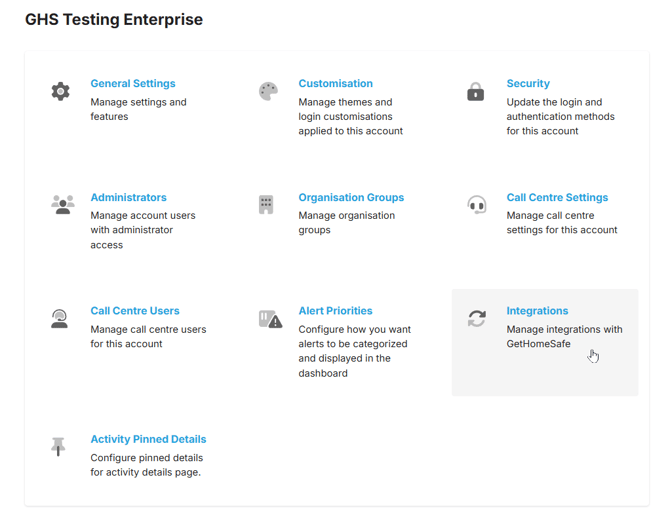
- Add Argus as an integration.
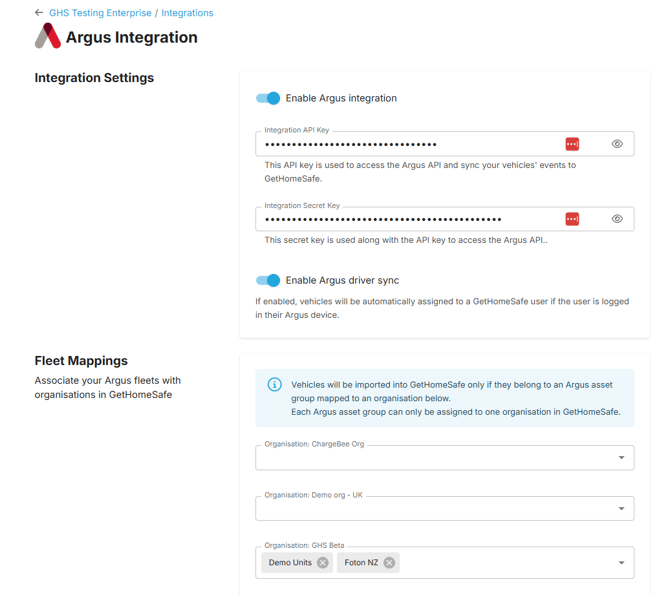
- To enable the Argus integration you will need to provide two API keys.
Paste your generated API Access key into the first API key field. This will enable the syncing of vehicle events to GetHomeSafe.
Paste the Integration Secret key into the second API key field to gain full access to the Argus API.
Configuring your Argus Integration
On the Argus integration setup page you may also configure your integration settings.
Fleet Mappings
The Fleet Mappings configuration allows you to associate your Argus fleets with particular Organisations in your Enterprise.