-1.jpg?width=400&height=46&name=GHS_Primary_Logo_Landscape_Full_Colour%20(1)-1.jpg)
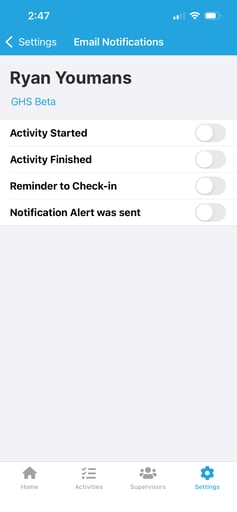
Many GetHomeSafe email notifications can be enabled or disabled based on your preferences. The notifications listed below can be managed directly through the app.
The following email notifications can be toggled on or off in the app:
- Activity Started
- Activity Finished
- Reminder to Check-in
- Notification Alert was sent
Note - If the email notification you want to adjust does not appear in the list above, it is likely a Team Leader-specific notification. For more information, see Configuring and Managing Teams.
To manage your email notification preferences, follow these steps:
- Open the GetHomeSafe app
- Tap Settings in the bottom-right corner of the screen
- Tap Email Notifications
- Toggle each notification on or off according to your preferences