-1.jpg?width=400&height=46&name=GHS_Primary_Logo_Landscape_Full_Colour%20(1)-1.jpg)
When an alert is triggered, the web portal plays a continuous sound until a follow-up is started, or the alert is cancelled. Select the speaker icon at the top of the page to turn sounds on/off.
The option to turn alert sounds off for call centre users is not available.
Users may change their preferred dashboard alert sound. To do so, follow these steps:
- Click on your name in the top right of the dashboard screen
- In the menu that appears, click Settings
- Then click Notifications
- In this page, you will see settings for the Dashboard alert sound (see below). Use the volume button next to the drop down menu to test out what they sound like and select the alert sound that you prefer.
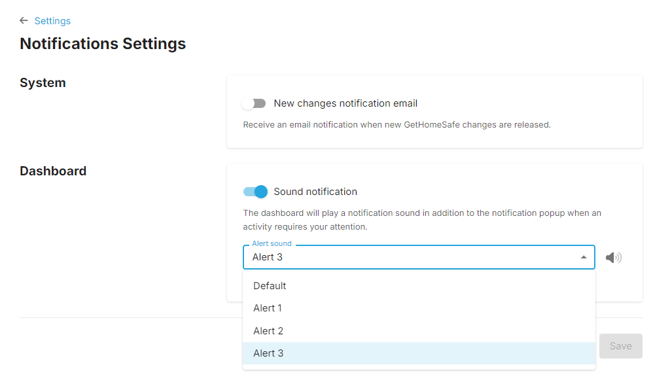
Note - Changing your alert sound can be beneficial if you are in an environment where multiple people have the dashboard open and you need to quickly identify whether your computer is making the noise or someone else's.